MSI Katana 17 HX B14WGK-025CZ/i9-14900HX/32GB/1TB SSD/RTX 5070, 8GB/17,3"QHD IPS
A 17-inch powerhouse that delivers more frames than it costs euros — as long as you can live with some fan noise.
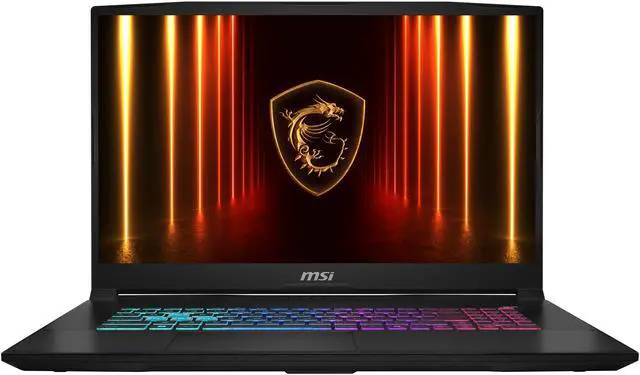
The Katana 17 HX is MSI's familiar playbook: cram a hefty i9-14900HX and an RTX 5070 into an affordable shell and accept that a corner or two got cut. What genuinely stands out is how comfortably it chews through modern games at 1080p while keeping the price reasonable. The display, though, runs on the dim side and the fans make themselves heard under load — this isn't a machine you quietly crack open on a train.
Reasons to buy
- The RTX 5070 paired with the 24-core i9-14900HX pushes demanding games to a smooth 70-90+ fps at Full HD
- Solidly built plastic chassis with minimal deck flex — it feels pricier than the sticker suggests
- Roomy 17.3-inch screen and a 1TB NVMe SSD as standard, with easy access to add RAM and storage
- Genuinely sharp pricing for this hardware combo — raw performance per euro
Reasons to consider
- The IPS panel is fairly dim and not as vibrant as rivals in this bracket
- Fans spin up loudly under load, and CPU productivity scores trail comparable laptops
- The touchpad is a little finicky, and at 2.7 kg plus charger this is no travel companion
Performance where it counts
The heart of this build is the Intel i9-14900HX teamed with the RTX 5070 (8GB GDDR7, DLSS 4). At the native Full HD resolution that's plenty of muscle: in heavier titles like Indiana Jones and the Great Circle it averages 70 to 90 fps on Ultra, depending on how busy the scene gets. The 144Hz panel — or the optional 240Hz QHD screen — has the headroom to show it off. The caveat: reviewers note the CPU's productivity performance trails comparable machines, and the cooling has to work hard to dump all that wattage. That shows up as audibly loud fans under full load. For pure gaming it's a non-issue, but anyone hoping for a silent work machine will be disappointed.
Build, display and the trade-off
The chassis is all plastic, but the thick, reassuring kind — the deck barely flexes when you press firmly, and the angled lines and dragon logo give it a subtly aggressive look. At 2.7 kg this is a desktop replacement, not an ultrabook. The clearest compromise is the screen: the IPS panel skews dim and the colours are less saturated than you'd get on pricier models. You'll notice it less while gaming on the couch, but photo editors and colour sticklers will feel the gap. The 75Wh battery nudges just past 5 hours of light use — fine for the class, but plan on keeping the charger close while gaming.
Who is it for?
Ideal for the student or home gamer chasing maximum fps per euro who wants a big 17-inch screen. Skip it if you want something quiet and light to carry around, or if screen colour accuracy matters for your work.
FAQ
Can I actually work on it, not just game?
Absolutely — that i9 and 32GB of RAM breeze through spreadsheets, video and heavy multitasking. Just know the fans get loud under demanding loads and the display is a touch dim for colour-critical work.
Can the memory and storage be upgraded later?
Yes. The 1TB NVMe SSD and RAM are reachable from the bottom panel, so you can add or swap without much hassle — a handy way to extend the laptop's lifespan.